
Markdown, at your fingertips.
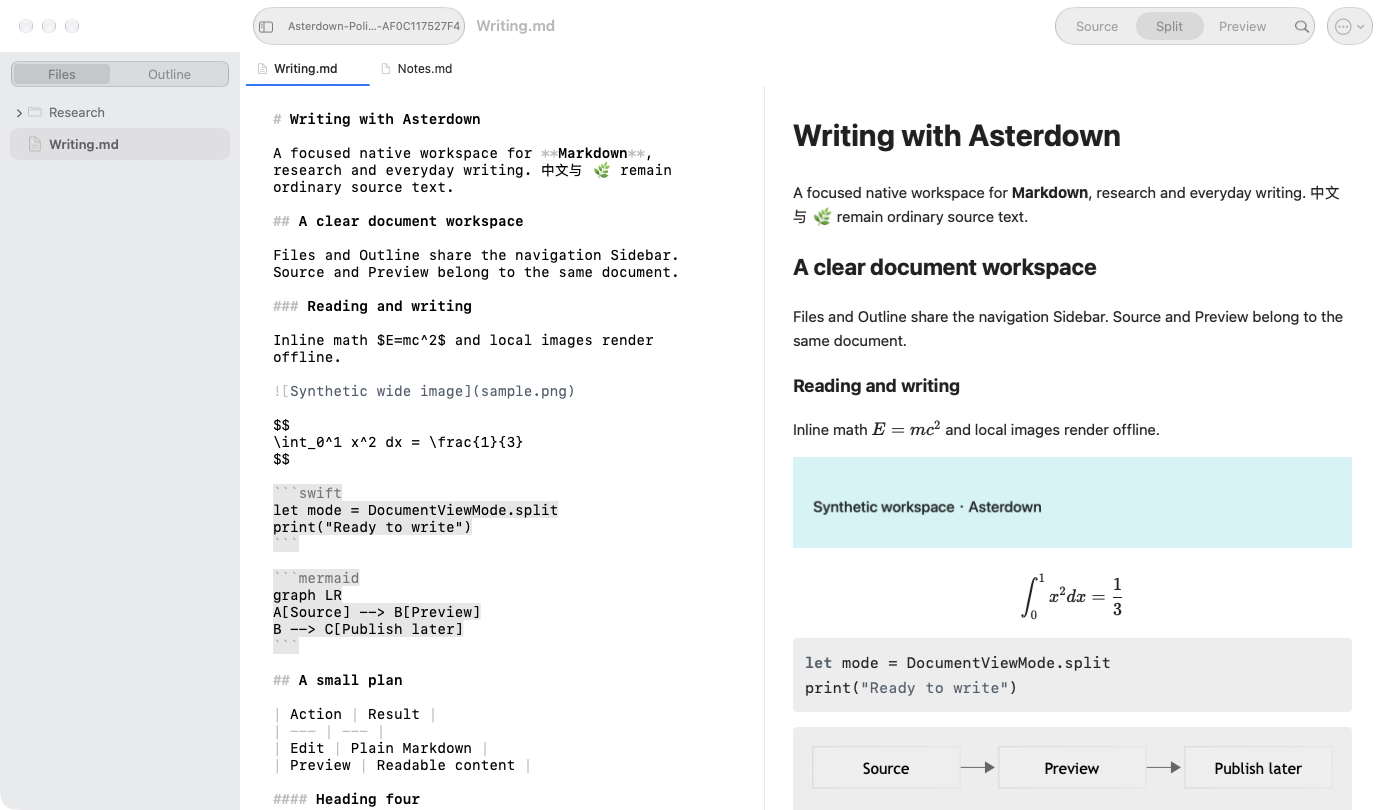
Write directly in Markdown with native text selection, Find, familiar formatting shortcuts, and Undo. The source stays yours.
Asterdown / Features
From the first outline to the final paragraph, keep your writing close and the tools within reach.
From the first outline to the final paragraph, keep your writing close and the tools within reach.
Write directly in Markdown with native text selection, Find, familiar formatting shortcuts, and Undo. The source stays yours.
Open a real folder. Move between document tabs, jump to a heading, or find a phrase across your workspace.
Switch between source, split view, and preview. Tables, highlighted code, math, and Mermaid diagrams bring a document into focus.
Save standard Markdown files in folders you choose. Keep working with Finder, Git, and the other tools you already use.
Paste or drag images into local assets. Inspect references and run upload, download, or migration tasks with providers you configure.
Choose light, dark, or system appearance, with six accent options. The editor and preview share a coordinated palette.
CommonMark and GitHub Flavored Markdown form the foundation. Choose Standard, GitHub, or Typora profiles for the extensions your document needs.
Extensions vary by profile. Preview supports a sanitized subset of HTML; full compatibility with other editors is not promised. Front Matter is recognized in the source and omitted from preview.